Why You Should Log In to Your Travel Charge Card Account
You should log in to your online or mobile account with the travel charge card vendor to review transactions, check your balance, access statements, confirm payments, set alerts, and address questionable charges.
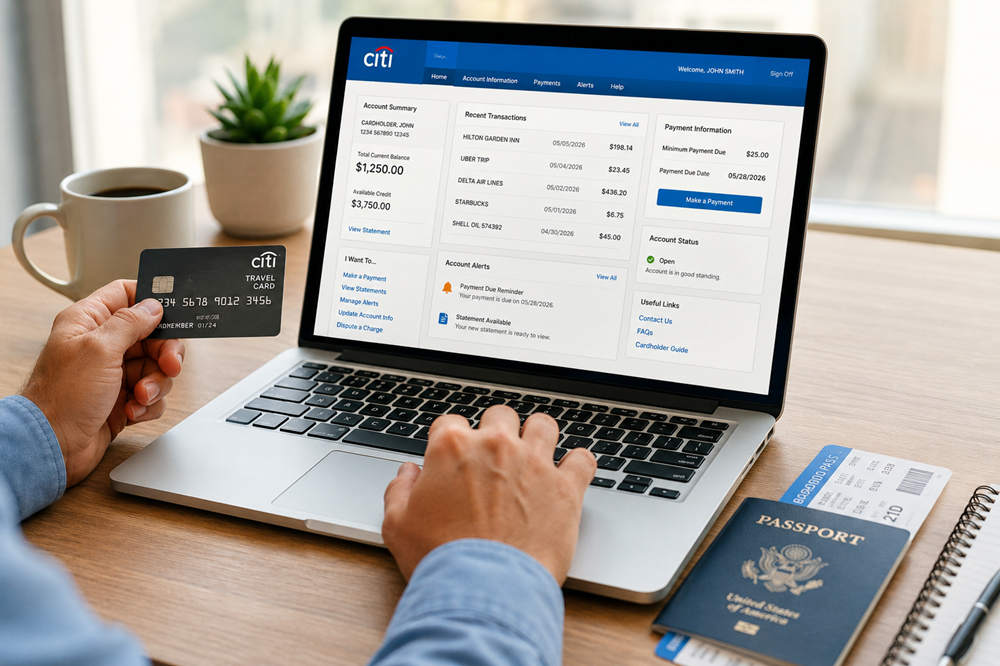
For Department of Defense travelers, the Government Travel Charge Card (GTCC) account is managed through CitiManager. Regularly checking the account helps you see what has actually posted to the card instead of relying only on receipts, travel vouchers, or reimbursement notifications.
What You Can Do Through CitiManager
The Defense Travel Management Office’s cardholder guidance explains that CitiManager can be used online or through its mobile app. The available tools make it easier to manage the card before, during, and after official travel.
Review Transactions and Account Balances
The transaction screen shows purchases, credits, refunds, and payments that have posted to the account. Comparing these entries with hotel bills, transportation receipts, and other travel records can help you identify:
- A duplicate charge
- An incorrect transaction amount
- A hotel hold that has not been released
- A missing refund or credit
- A merchant name you do not recognize
- A charge that may not be related to authorized official travel
The account dashboard also shows the current balance and available credit. This information is especially useful before another trip because an unpaid balance, restricted credit limit, or suspended account may prevent the card from working when it is needed.
Access Statements and Confirm Payments
A monthly statement provides the official record of transactions for the billing cycle, along with the amount due and payment deadline. Reviewing it is important because recent activity alone may not show which charges are included in the current bill.
CitiManager also lets cardholders make payments and check whether a payment has posted. Do not assume that a scheduled payment, mailed check, or travel reimbursement has already reached the account. Confirming the posted payment can reveal a delay or remaining balance while there is still time to correct it.
Set Alerts and Maintain Account Information
CitiManager alerts can be delivered by email, text message, or both. Depending on the options available for the account, they may provide notice of new transactions, statement availability, approaching payment deadlines, or account status changes.
Alerts are most useful when the vendor has current contact information. Review your email address, telephone number, mailing address, and notification preferences after a move, change of duty station, or replacement of a mobile device.
Use the official CitiManager website or authorized mobile app when accessing the account. Never provide a password, PIN, or one-time security code in response to an unexpected email or text message.
Address Incorrect or Unauthorized Charges
If you recognize the merchant but believe the amount or service is incorrect, review the receipt and contact the merchant when appropriate. The merchant may be able to correct a duplicate charge, missing credit, or billing error directly.
If the issue is not resolved, initiate a formal dispute with the travel charge card vendor. Under the current Government Travel Charge Card Regulations, a dispute must generally be filed within 60 days of the billing statement date on which the incorrect charge first appeared.
A transaction you did not authorize should be reported to the vendor promptly as suspected fraud. Continue paying all valid, undisputed charges while the disputed amount is being reviewed.
Why CitiManager Still Matters After You Use DTS
CitiManager and the Defense Travel System serve different purposes.
CitiManager manages the travel card account. It displays transactions, statements, balances, payments, alerts, and disputes.
DTS is used for travel authorizations, reservations, vouchers, and reimbursement processing.
Submitting or receiving approval for a DTS voucher does not prove that the travel charge card has been paid in full. Reimbursement for card expenses is normally sent directly to the vendor through split disbursement, but the amount may not always cover every charge.
Some expenses may post after the voucher is prepared, or the split-disbursement amount entered on the voucher may be too low. Cardholders are responsible for checking the account and paying any remaining undisputed balance directly to the vendor.
When Should You Log In?
You do not need to check the account constantly, but there are several points when logging in is particularly useful.
Before Official Travel
Confirm that the account is open, the card is active, and enough credit is available for the expected expenses. Resolve any previous balance or account restriction before leaving.
During the Trip
Review the account when a card is declined, an unfamiliar alert appears, or a merchant places an unexpectedly large hold. Early action may prevent an account issue from disrupting the rest of the trip.
After the Trip
Match posted transactions with receipts before completing the voucher. This helps you enter an accurate split-disbursement amount and identify charges that require clarification.
After Reimbursement
Verify that the reimbursement payment reached the vendor and was credited to the correct account. Pay any valid balance that remains rather than assuming the voucher covered everything.
Why Monitoring the Account Matters
Cardholders with an Individually Billed Account are responsible for paying the full undisputed amount by the due date on the statement, regardless of whether their travel reimbursement has been completed.
If the balance remains unpaid, the account becomes past due and may eventually be suspended. Current GTCC regulations provide for card suspension at 61 days past billing, which blocks new charges and ATM access until the required payment is received.
A first late fee may be assessed at 75 days past billing. If an unpaid balance reaches 126 days past billing, it can become subject to salary-offset collection. Supervisors and program officials may also be notified as the account moves further into delinquency.
These consequences are easier to avoid when the cardholder regularly reviews statements, confirms payments, and addresses small discrepancies before the payment deadline.
What If the Card Was Used for a Nonofficial Expense?
The GTCC is intended for authorized official travel expenses. Personal use and other unauthorized purchases may be treated as card misuse.
If a charge may have been placed on the card for a nonofficial expense, do not ignore it or describe it as a billing dispute when the transaction was actually authorized. Pay the amount owed promptly and contact your Agency Program Coordinator for the procedures required by your organization.
Where to Get Help
The appropriate contact depends on the problem:
- The merchant: Questions about a known purchase, deposit, refund, or incorrect amount
- Citi customer service: Login problems, payments, fraud, statements, card replacement, PIN assistance, or transaction disputes
- Your Agency Program Coordinator: GTCC policy, card activation, credit limits, account status, organizational procedures, or suspected misuse
Your Agency Program Coordinator is generally the first local point of contact for travel card questions. The Citi Government Travel Card Cardholder Guide also explains account statements, online payments, alerts, and the dispute process.
Final Takeaway
Logging in to your travel charge card account gives you the information needed to manage the card responsibly. It allows you to review charges, confirm reimbursement payments, monitor the balance, and correct problems before they lead to a missed payment or suspended account.
A completed trip or approved voucher does not necessarily mean the card balance is zero. Checking CitiManager is the most reliable way to see what is still owed and make sure the account remains ready for future official travel.