What Is a Travel Router? A Simple Guide for Connected Trips
Connecting to hotel Wi-Fi can become inconvenient when two travelers have several phones, laptops, tablets, or streaming devices. Each device may require a separate login, and some networks make it difficult to connect equipment that cannot display a hotel sign-in page.
A travel router creates one personal Wi-Fi network for your devices while using an existing internet connection. It can make getting online easier for couples who work, stream, plan activities, or manage several devices during a trip.
What Is a Travel Router?
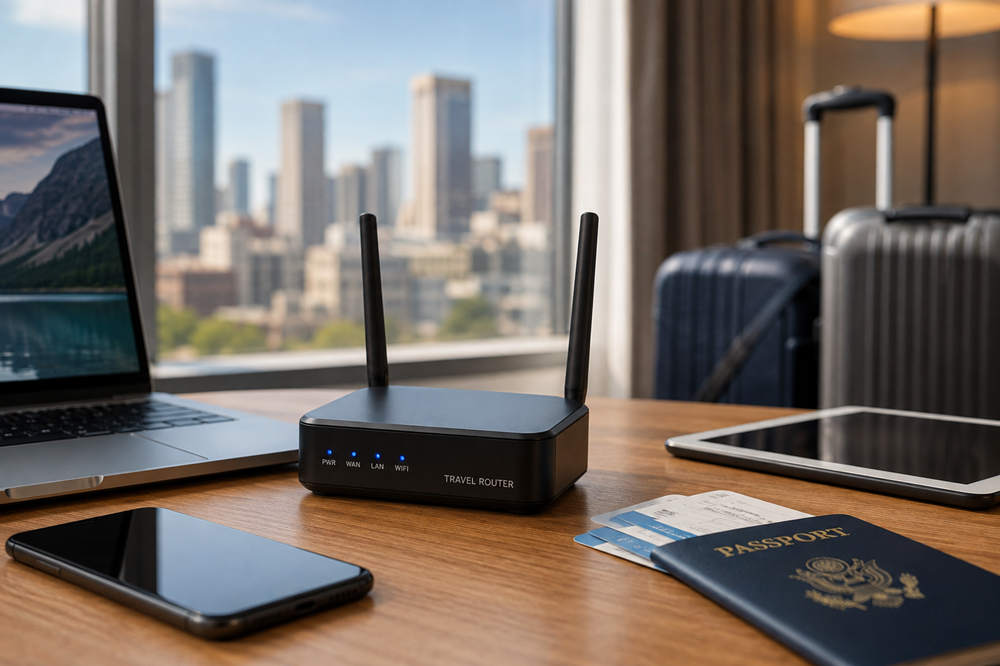
A travel router is a compact router designed for use away from home. It connects to an available internet source and then shares that connection through its own Wi-Fi network.
The incoming connection may come from hotel Wi-Fi, an Ethernet cable, a tethered phone, or a compatible cellular modem. Your devices connect to the travel router rather than joining the original network individually.
Most travel routers do not provide internet access by themselves. They need an existing wired, wireless, or cellular connection. Models with built-in SIM support are available, but they are closer to cellular hotspots and require a compatible data plan.
How Does a Travel Router Connect to the Internet?
The connection method depends on where you are staying and which features the router supports.
Hotel or Public Wi-Fi
In hotspot or WISP mode, the router joins a hotel, airport, or café network and shares that connection through a separate Wi-Fi name and password.
Many public networks use a captive portal, which is the sign-in page asking for a room number, access code, email address, or agreement to the network terms. Some travel routers allow you to complete this login once through the router and then connect your other devices to its personal network.
Captive-portal compatibility is not guaranteed. Hotel authentication systems differ, and some may require additional troubleshooting or assistance from staff.
Ethernet
If a hotel room or vacation rental has an active Ethernet port, you can connect it directly to the router. The router then turns the wired connection into Wi-Fi for your devices.
This can provide a more stable connection than repeating a weak wireless signal, although Ethernet ports are not available in every property.
Phone Tethering
Some models can use a phone’s mobile data connection through a USB cable. The phone supplies the internet access while the router distributes it to nearby devices.
This can be useful when hotel Wi-Fi is slow or unavailable. Your carrier’s hotspot allowance, roaming rules, and speed restrictions still apply.
Cellular Modem or SIM Card
Certain routers support a USB cellular modem or include a SIM-card slot. These models can connect directly to a mobile network, but they need a separate data plan and coverage at the destination.
Why Can a Travel Router Be Useful for Couples?
A couple may carry two phones, one or two laptops, a tablet, an e-reader, and a streaming device. A travel router lets all of them use the same familiar network name and password.
Once your devices have saved that network, they can reconnect whenever the router is powered on. At each new hotel, you only need to connect the router to the available internet source rather than setting up every device again.
This is especially useful for devices that struggle with hotel login pages, including streaming sticks, game systems, and some smart devices. It can also help when one partner is working online while the other is planning the day or watching a movie.
In many setups, the public network recognizes the router as the connected client. However, hotel connection limits, authentication rules, and acceptable-use policies still apply.
Travel Router vs. Mobile Hotspot vs. Wi-Fi Extender
| Device | Where the Internet Comes From | Primary Purpose |
|---|---|---|
| Travel router | Hotel Wi-Fi, Ethernet, phone tethering, or a supported modem | Creates a personal network for travel devices |
| Mobile hotspot | A cellular data plan | Shares mobile internet with nearby devices |
| Wi-Fi extender | An existing Wi-Fi network | Expands wireless coverage |
A travel router is generally the most flexible option because it may support several types of incoming connections. A mobile hotspot is better when cellular service is the main source of internet access. A Wi-Fi extender is mainly intended to improve coverage within a larger property.
Some products combine these functions, so check the supported operating modes instead of relying only on the product name.
Does a Travel Router Make Public Wi-Fi Safer?
A travel router can give you more control over how your devices join a public network, but it does not make all internet activity automatically private.
Your phones and laptops connect to the router’s password-protected Wi-Fi instead of joining the hotel network directly. In routing mode, the router may also isolate your personal devices from other users on the public network.
Look for a model that supports WPA3 security. WPA3 strengthens the wireless connection between compatible devices and the router, but it does not encrypt every part of your internet traffic after it leaves the router.
A router-level VPN can add an encrypted tunnel for connected devices, including equipment that cannot run a VPN app. This benefit only applies when the router supports the required VPN protocol and the VPN is configured correctly.
Public Wi-Fi is generally safer than it once was because most websites now use HTTPS encryption. The Federal Trade Commission still recommends keeping devices updated, using strong passwords, enabling two-factor authentication, and checking that websites use secure connections.
You should also confirm the official name of the hotel or café network. A travel router cannot determine whether a similarly named hotspot is legitimate.
What Can a Travel Router Not Do?
- It cannot create internet access from nothing. A standard model needs Wi-Fi, Ethernet, phone data, or a supported modem.
- It cannot make a slow connection faster. All connected devices share the speed provided by the original network.
- It cannot repair an outage. If the hotel internet goes down, the router also loses access unless you switch to another source.
- It cannot guarantee captive-portal compatibility. Some hotel networks restrict or block routers.
- It cannot replace a cellular hotspot unless it supports cellular service or phone tethering.
- It cannot guarantee privacy. Security still depends on updates, passwords, HTTPS, VPN settings, and safe browsing habits.
When Is a Travel Router Worth Packing?
A travel router may be worthwhile when:
- You and your partner travel with several connected devices.
- One or both of you work remotely during the trip.
- You frequently stay in hotels or vacation rentals.
- You use a streaming stick, game console, or another device that cannot easily open a hotel login page.
- You want the same Wi-Fi name and password at every stop.
- You want to run a compatible VPN from the router.
- You need the flexibility to switch between Wi-Fi, Ethernet, and phone data.
It may not be necessary when you travel with only one or two devices, rarely use public Wi-Fi, or already have a phone plan with enough hotspot data. For a short weekend trip, carrying another device may create more setup than it saves.
What Should You Look for in a Travel Router?
Consider how you normally travel before comparing advertised speeds. A practical travel router should match the connections and devices you actually use.
- Captive-portal support: Look for tools designed to handle hotel and public Wi-Fi sign-in pages.
- Connection modes: Check for hotspot, repeater, access-point, Ethernet, and USB-tethering support as needed.
- Wi-Fi security: Choose a model with WPA3 when your devices support it.
- VPN compatibility: Confirm that it works with the protocol and VPN provider you intend to use.
- Ports: Ethernet and USB ports can support wired internet, tethering, modems, or storage, depending on the router.
- Power: USB-C charging is convenient, especially when the router can run from the same charger or power bank as your other devices.
- Firmware support: Regular updates can improve security, compatibility, and reliability.
- Simple controls: A clear app or browser interface makes it easier to change networks after arriving at a new property.
Features vary widely. Do not assume that every travel router includes a cellular modem, VPN support, USB tethering, or captive-portal tools.
How Do You Set Up a Travel Router at a Hotel?
- Power on the router and connect your phone or laptop to its Wi-Fi.
- Open the router’s app or administration page.
- Select the hotel Wi-Fi network or connect an Ethernet cable.
- Complete the hotel’s captive-portal login if one appears.
- Confirm that the internet connection works.
- Connect your remaining devices to the router’s personal network.
- Enable a VPN afterward if you use one.
If the hotel login page does not appear, disconnect the router’s VPN temporarily, reconnect to the hotel network, or follow the manufacturer’s captive-portal troubleshooting instructions. Strict hotel networks may require help from the front desk.
Before leaving home, update the firmware, replace default administrator passwords, and practice connecting the router to Wi-Fi and phone tethering. This makes setup much easier after a long travel day.
Is a Travel Router Right for Your Next Trip?
A travel router is most useful for couples who depend on hotel Wi-Fi, carry several devices, work while traveling, or regularly change accommodations. It provides one consistent network and several ways to connect without configuring every device at each stop.
Couples who mainly use their phones may find a mobile hotspot simpler. The decision comes down to how many devices you carry, where your internet usually comes from, and how much control you want over the connection.